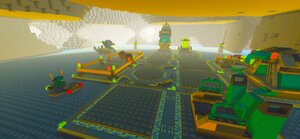
The results
The problem
When we shall help you, you have to give information (so also post it here!).
Please post the names of the texture bmp-files, the folder name they are in and the LEGO.cfg part where it says:
Textures {
...
YourTexture {
rooftexture World\WorldTextures\YourTextureRoof.bmpsurftextwidth 8surftextheight 8meshbasename World\ProMeshes\YourTexturePMtexturebasename World\WorldTextures\YourTextureFolder\YourTexture}...}
You said you renamed all the textures "DESXX". That's a BIG no-no. They MUST be named exactly as the other biomes have them named, otherwise the game won't recognise them.
Bite me.
I have never heard of this rule before, and I'm pretty sure I've renamed the texture files before.They MUST be named exactly as the other biomes have them named, otherwise the game won't recognise them.
Then how does LegoRR know which one is each specific texture? It's not listed anywhere in the .cfg...
I have never heard of this rule before, and I'm pretty sure I've renamed the texture files before.They MUST be named exactly as the other biomes have them named, otherwise the game won't recognise them.
Then how does LegoRR know which one is each specific texture? It's not listed anywhere in the .cfg...
If it weren't listed in the CFG how would it even find the texture files? ![]()
texturebasename World\WorldTextures\YourTextureFolder\YourTexture
Or are you saying something else?
Then how does LegoRR know which one is each specific texture? It's not listed anywhere in the .cfg...If it weren't listed in the CFG how would it even find the texture files?
texturebasename World\WorldTextures\YourTextureFolder\YourTexture
That points to the folder where the textures are located. The folder can be renamed whatever, but the actual textures inside the folder must be numbered exactly like those ones.
And on research, he's named them correctly ("apparently", I'd like to take a look at his folder setup). **** me.
RRF#1, I want you to zip up your textures and have a .txt file with your .cfg entries, and the filepaths to where you had the textures located. Make sure you include the roof texture you're using, because that's in a separate file.
It says folder right above that in the directory. The files can be named whatever. They have to be numbered the same, yes, but I assumed you were saying that they could only be called Rock, Ice or Lava.That points to the folder where the textures are located. The folder can be renamed whatever, but the actual textures inside the folder must be numbered exactly like those ones.
I forgot about the word before the numbers ![]()
The mistake - in my view - is very obvious.
This is the code in the CFG:
Desert {rooftexture World\WorldTextures\rockroof.bmpsurftextwidth 8surftextheight 8meshbasename World\ProMeshes\RockPMtexturebasename World\WorldTextures\DesertSplit\Desert
And a quick other note, rooftexture World\WorldTextures\rockroof.bmp[/code] should be rooftexture World\WorldTextures\DESERTROOF.bmp
You should make sure all your textures are in caps. Right now about half are DESXX and the other half are desXX. Pick one or the other and make sure you write it in caps in the .cfg.
EDIT: Alan. Y u do dis 2 meh? I think I might be blind.
FIRST: The '}'at the end is missing
It is there, I just forgot to include it.
It is actually explained exactly enough so this mistake shouldn't have happened... why didn't you follow the instructions?
I didn't think they were clear. But, now I know. So next time I want to add another biome texture, I'll refer back to this
Thank you all for the help you've given me.
You should make sure all your textures are in caps. Right now about half are DESXX and the other half are desXX. Pick one or the other and make sure you write it in caps in the .cfg.
Not necessarily. The game doesn't mind whether the BMPs are in caps or not (just tested it and some of the original textures are not in caps too (for me)).
@Rock Raider fan no.1:
You can change the topic to solved now ![]()
You should make sure all your textures are in caps. Right now about half are DESXX and the other half are desXX. Pick one or the other and make sure you write it in caps in the .cfg.
Not necessarily. The game doesn't mind whether the BMPs are in caps or not (just tested it and some of the original textures are not in caps too (for me)).
Consistency is important in any project.
Yes, but in this case it's not so important because it also works with caps and non-caps at the same time used.
|
Classic LEGO Games →
Rock Raiders →
Mods →
Modding Discussion →
Reactivating things (Can be locked now, I guess)Started by Brett3.92, 04 May 2013 |
|
|
|
|
Solved
LEGO Discussion →
LEGO Theme Discussion →
Rock Raiders →
Lego Rock raiders. First sight of the future?Started by Ben24x7, 02 May 2013 |
|
|
|
|
Off-topic →
Gaming Discussion →
Eve Online!Started by GalGamJD, 20 Apr 2012 |
|
|
|
|
Classic LEGO Games →
Rock Raiders →
Support →
Seam BugStarted by fun, 15 Jan 2012 |
|
|
|
|
Solved
Classic LEGO Games →
Rock Raiders →
Support →
Another Problem With Rr And Windows 7Started by lazarus238, 17 Dec 2011 |
|
|